GodwinMix is a free, open source live video mixer.
Every camera, phone, guest, web page and clip shows in one window, in a browser or a desktop app. You put the next shot in Preview, press Take, and the programme goes out to YouTube, Facebook and anywhere else you stream to while it records on your own machine.
Free forever. Apache 2.0 licence. No account, no subscription.
Both films show the real product running on a laptop. The camera pictures are demo footage cut from an open Creative Commons film, played into the desk as if they were cameras.
Download GodwinMix free
Latest release
A Sunday service, ready for everyone watching
One volunteer can switch between cameras, put lyrics over the picture and send the service to YouTube and Facebook together.
Set up on your own computer
Connect your cameras, choose a preset and rehearse your first show. Your recording stays on your machine.
What the desk does for you and for the people watching
Each of these is in the product today.
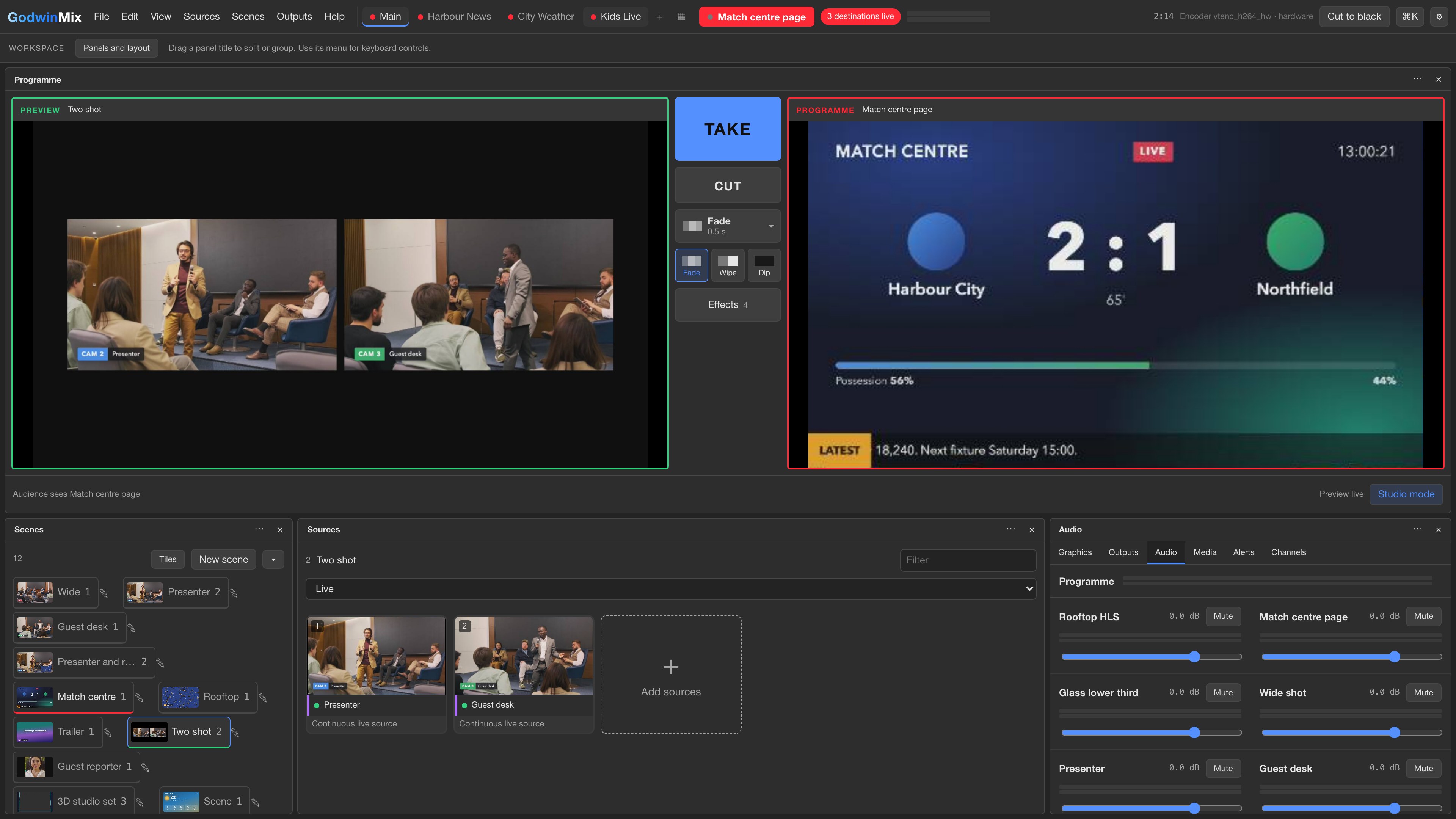
Preview, Programme, Take
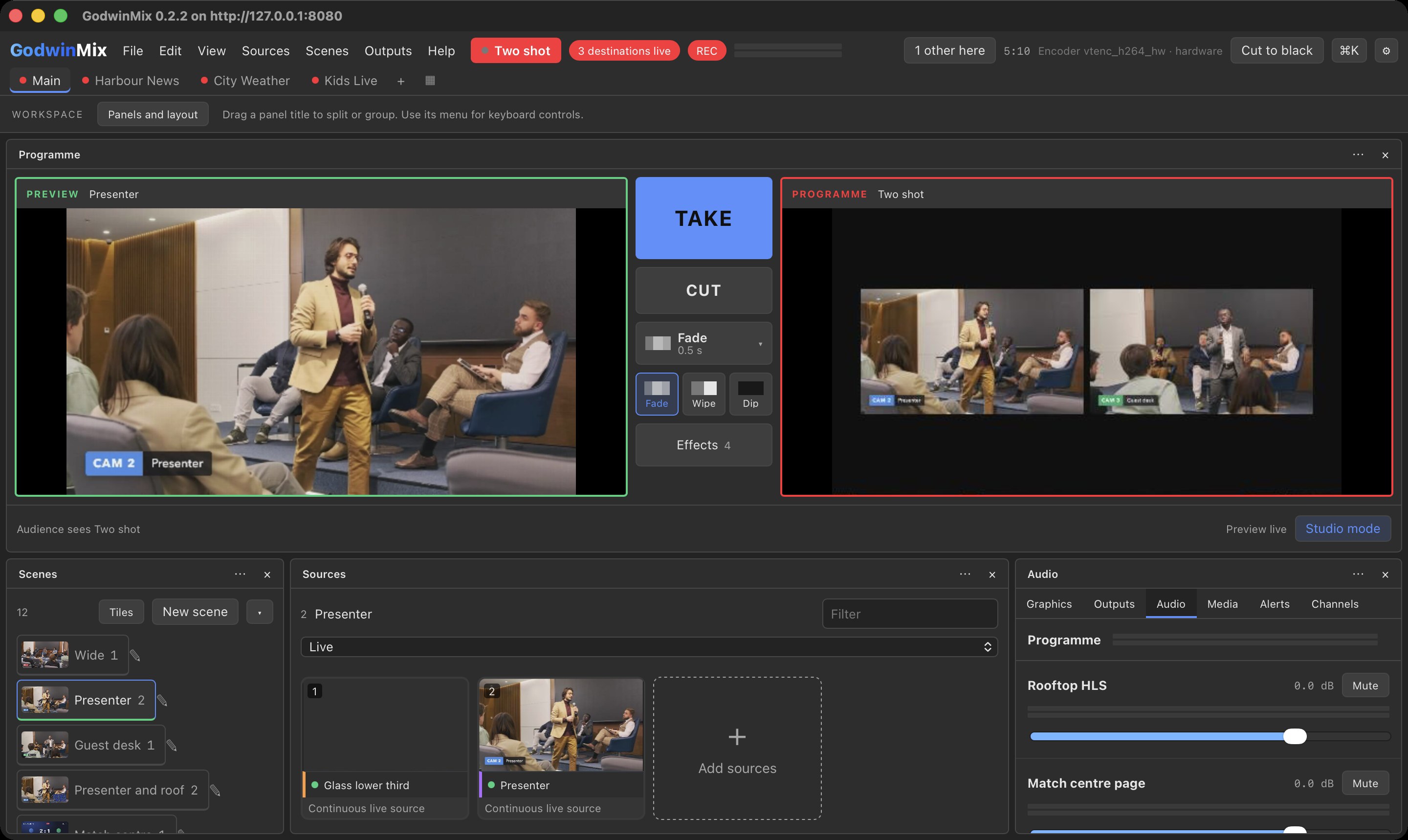
The next shot waits in Preview with a green edge while the audience watches Programme with a red one. Press Take for a smooth change or Cut for an instant one. Both buttons stay large and in the same place on a laptop, a tablet or a phone.
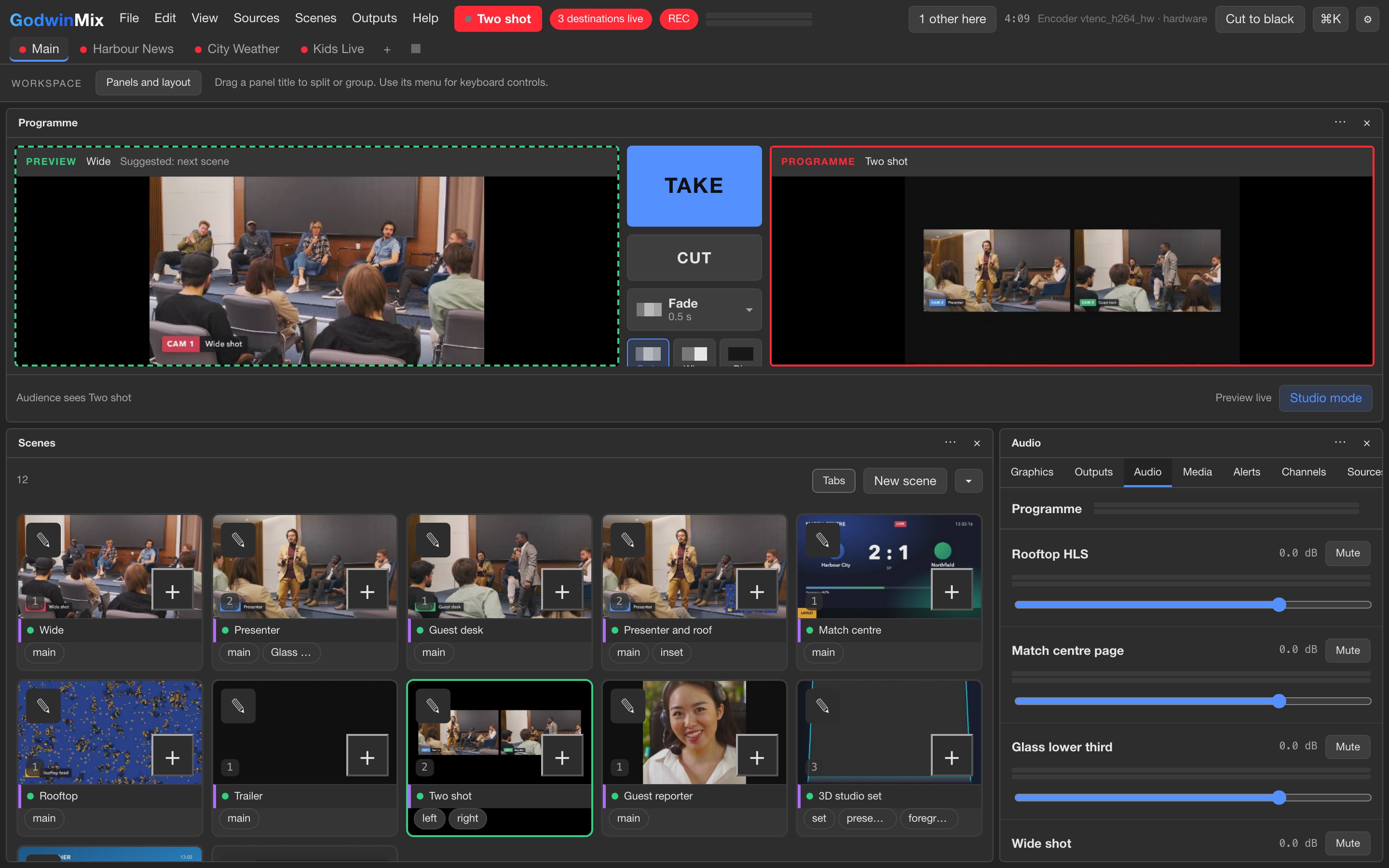
Scenes you can see before you take them
A scene is a saved arrangement: one camera full screen, two side by side, a picture in picture, a quad, a split. Every scene tile shows a moving picture, so you choose the next shot by looking at it.
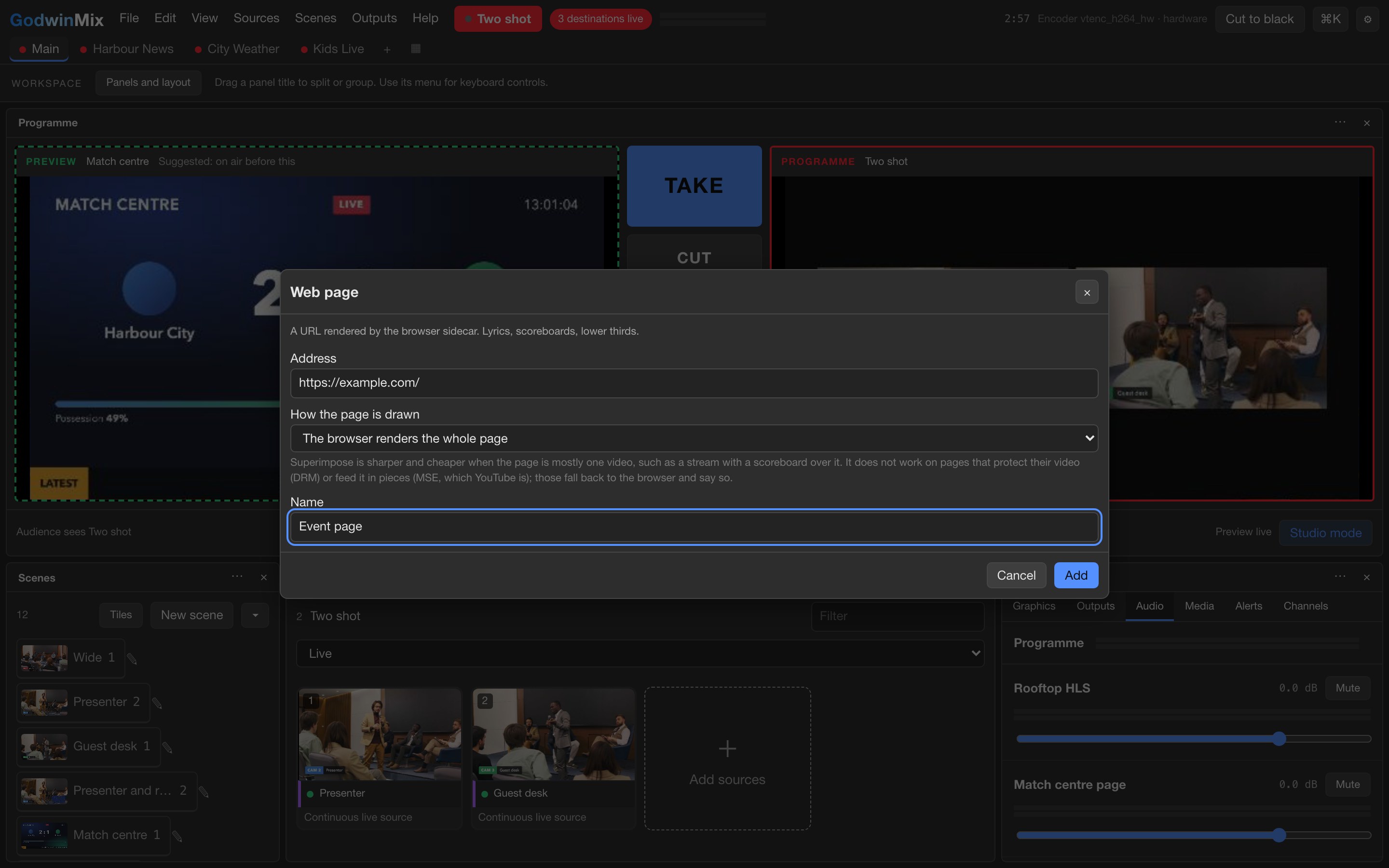
Web pages as pictures
Paste the address of a lyrics page, a slide deck or a live scoreboard and it becomes a source like a camera, drawn by a real browser with its sound. The words your team already keeps on a website go straight on air.
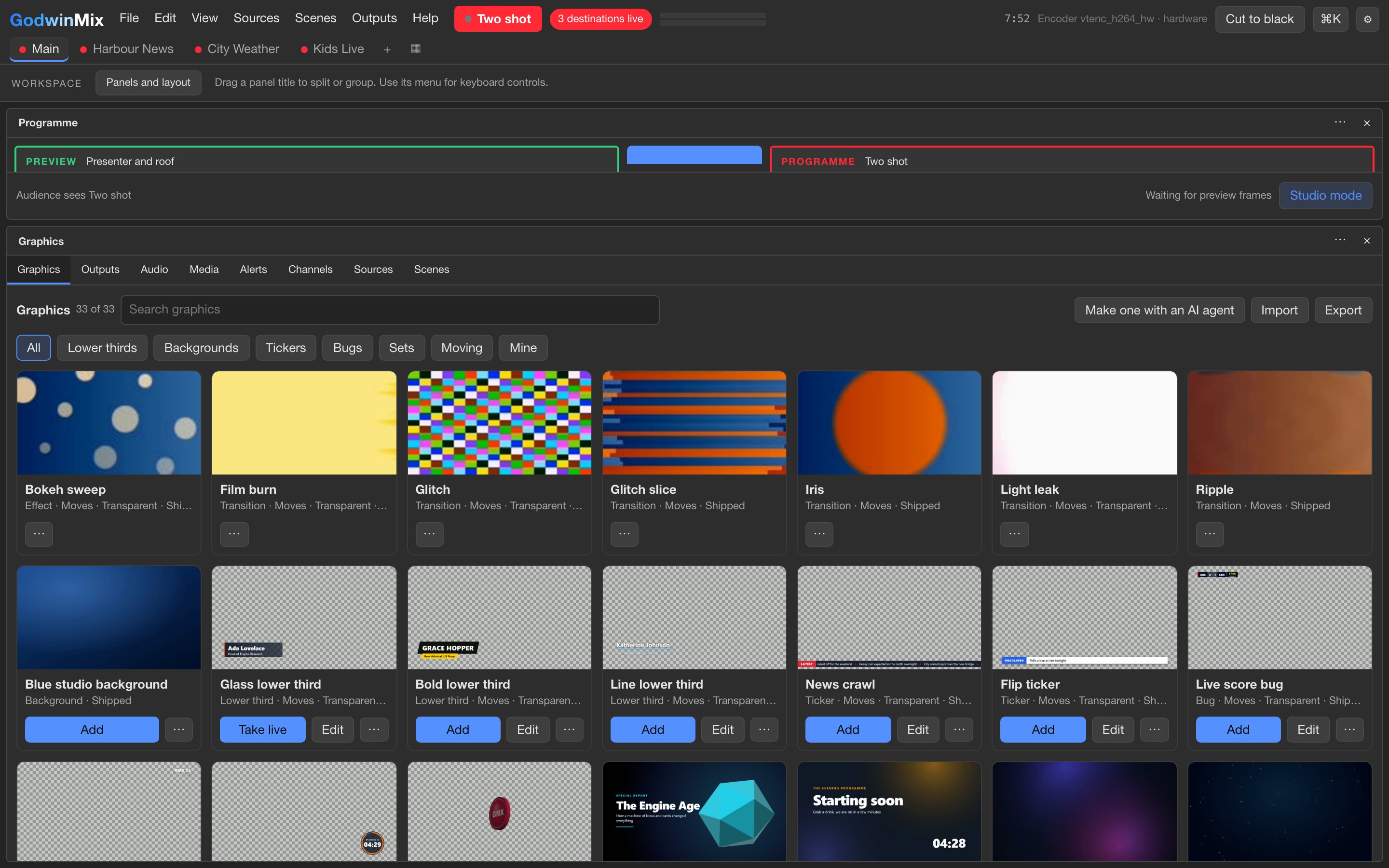
A gallery of graphics
Name straps, tickers, score bugs, countdowns, title cards and a 3D studio set sit as cards. Add one, put it on air, change its words while it is up. A presenter can be placed in a virtual set with a green screen or with no screen at all.
Several destinations, and a recording
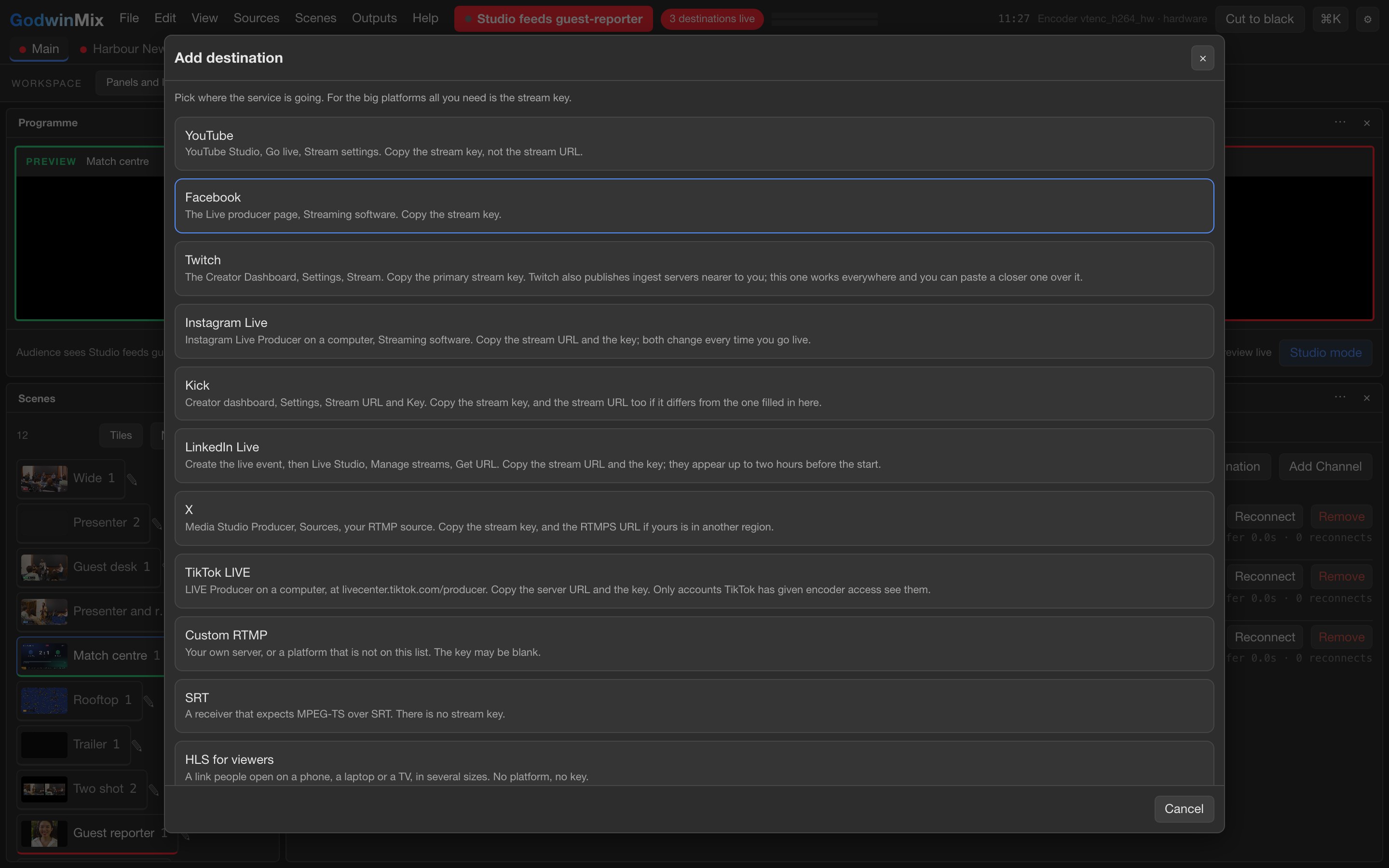
YouTube, Facebook, Twitch, Instagram Live, Kick, LinkedIn Live, X, TikTok LIVE or your own server, several at the same time. Pick the platform, paste its key once. A recording runs alongside, and the file stays playable even if the machine crashes halfway.
Guests by link, phones as cameras
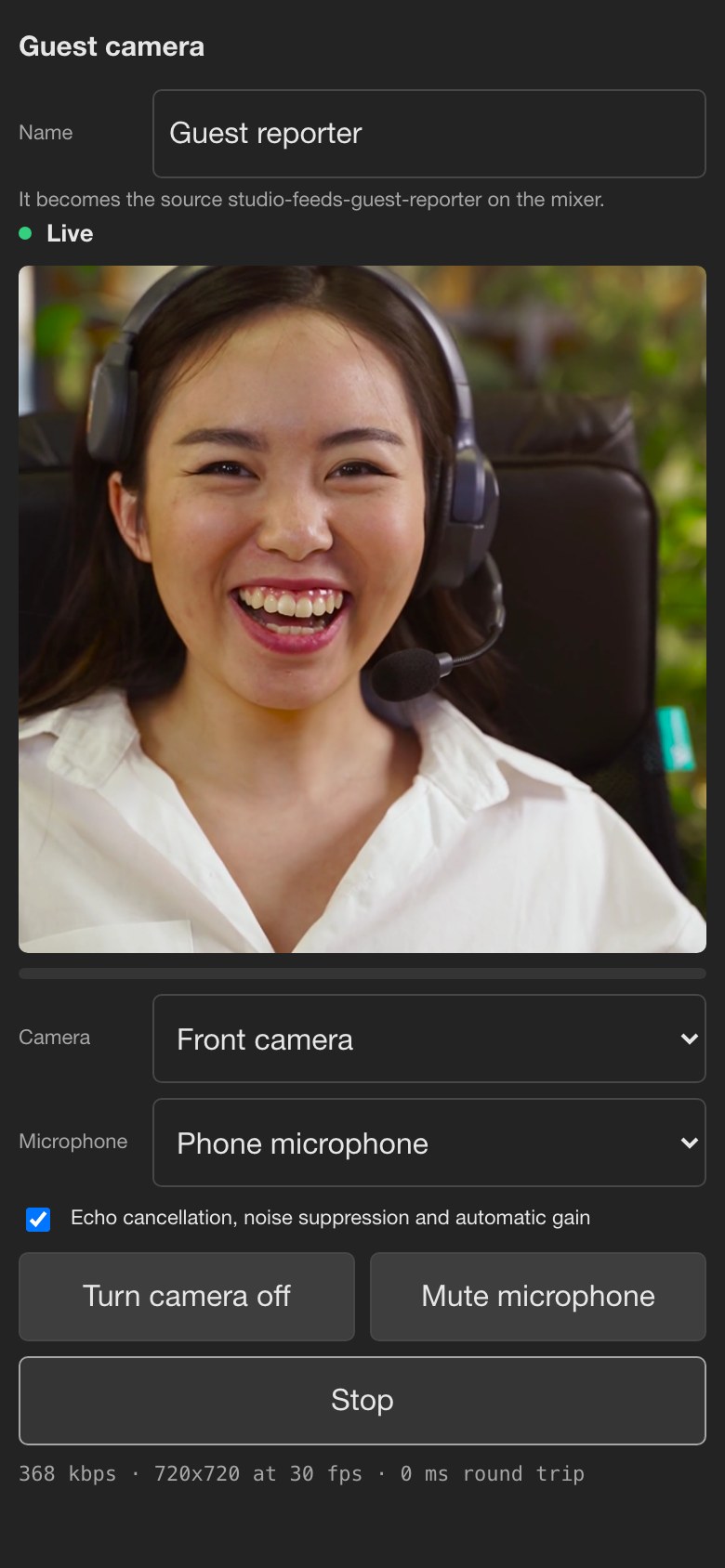
A guest opens a link in their browser and is live with nothing to install. A phone in the room becomes another camera when someone scans a code on the desk. Each phone gets its own name and can flip between its front and back camera.
The picture does not freeze
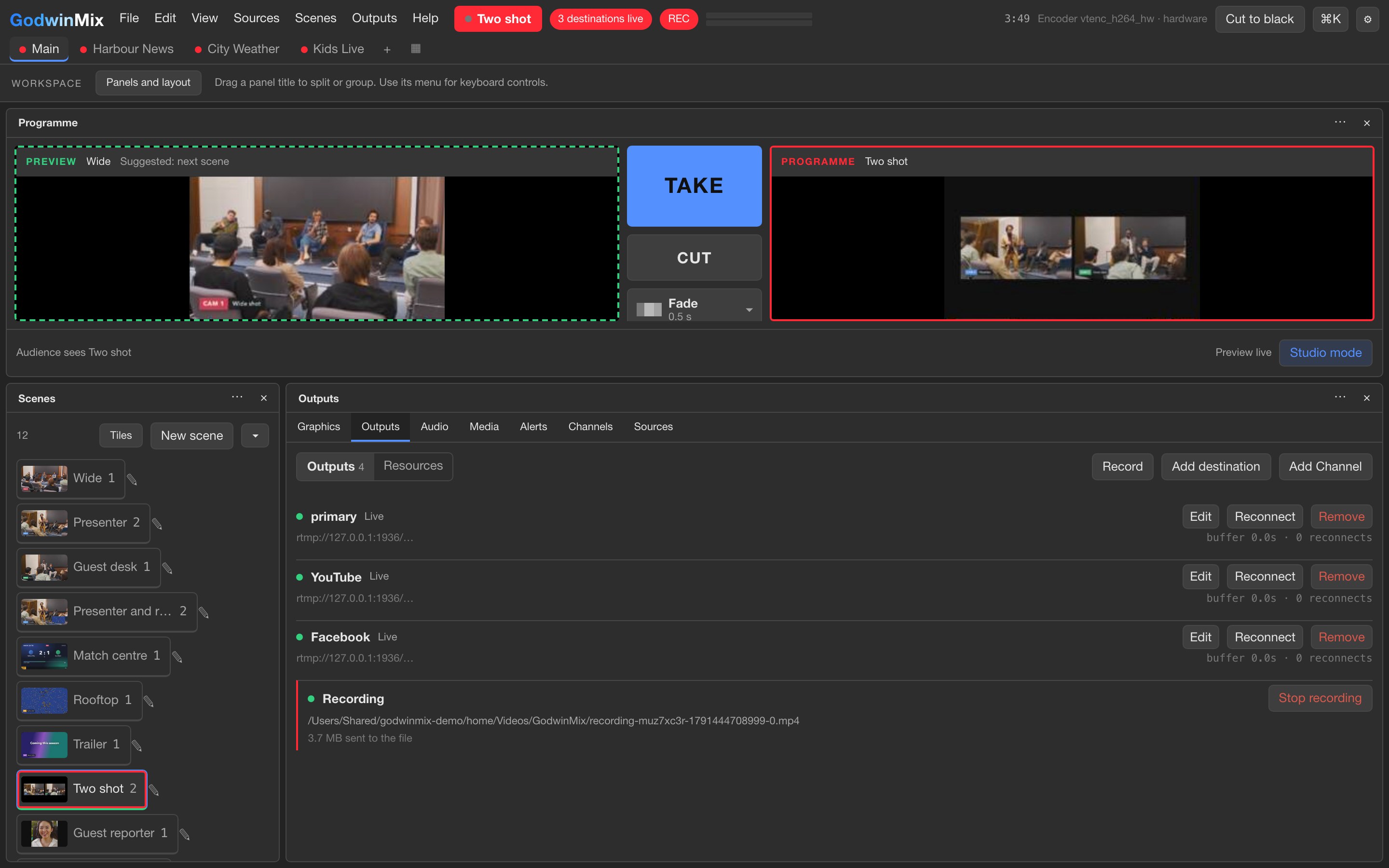
If a camera dies, viewers see a clean black picture in its place and the stream carries on, with every destination still connected. When the camera comes back you take it again. A destination that drops reconnects by itself and the others never notice.
From a tablet, or with a helper
The desk works by touch with large targets, so a tablet or phone can run the show. Scan a code from the desktop app and that device signs in with its own access, which you can take back at any time. Two or three people can work the same show, each with their own undo.
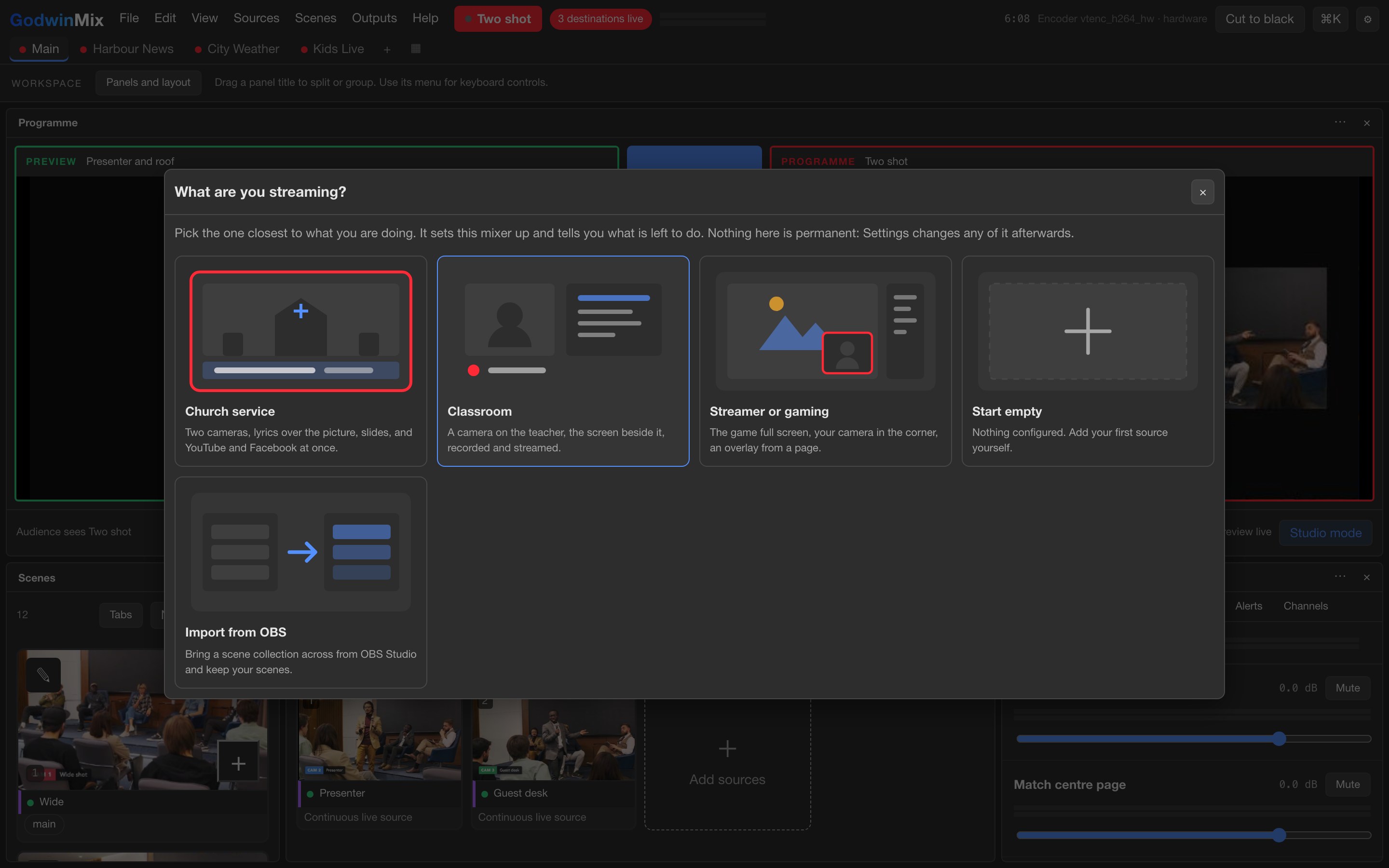
Ready made starting points
Presets set the desk up for a church service, a classroom, an esports match, a broadcaster's feed or a channel that runs by itself. The church preset gives you the scenes, two destinations and a red button to go live, and a church already streaming can move across in an afternoon.
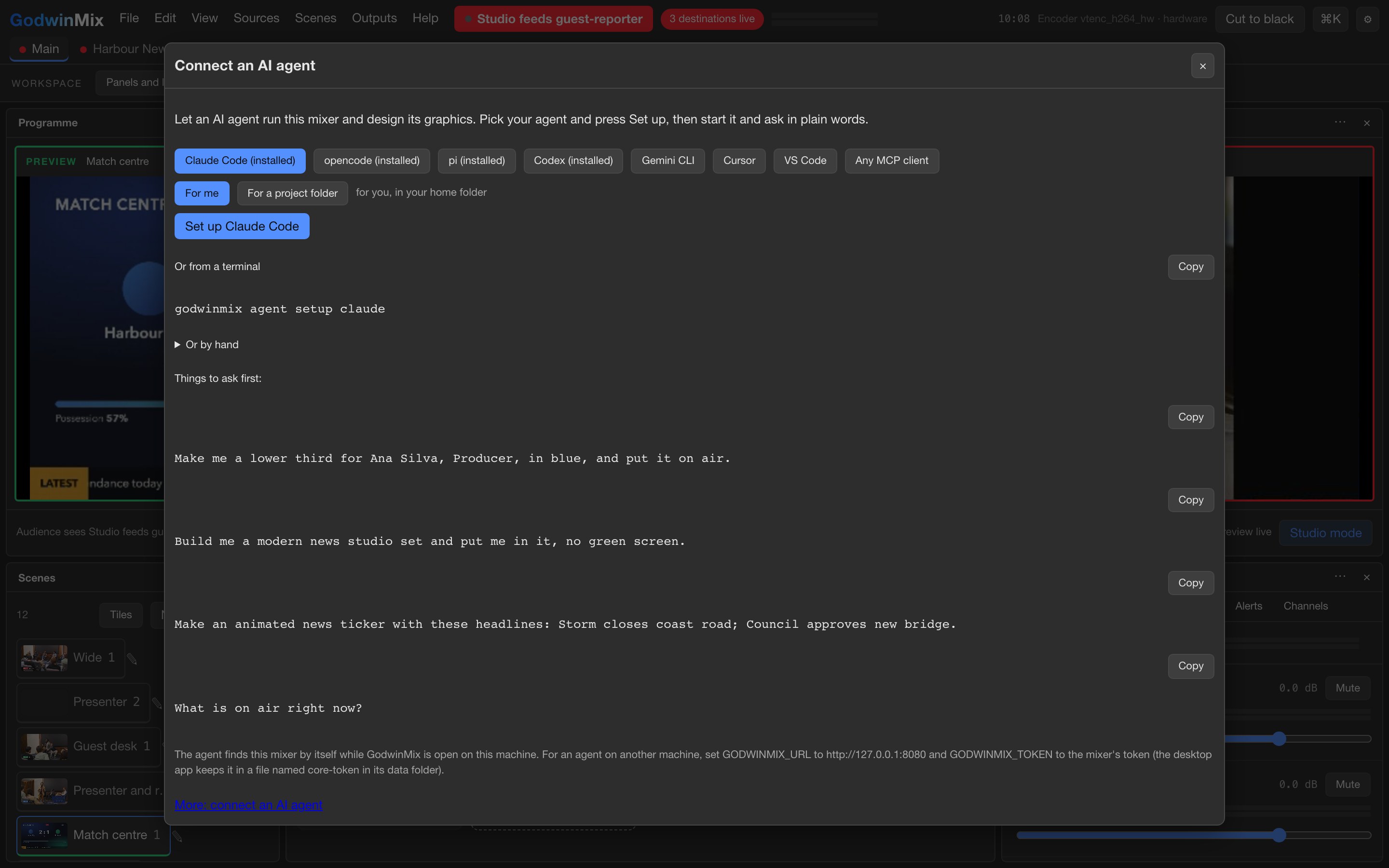
A script or an AI agent can drive it
Everything you can do with the mouse, a script can do too, and so can an AI assistant once one button has connected it. Ask it in plain words for a name strap or a change of shot. The desk holds an agent to at least eight seconds per shot, so the picture never flickers between cameras.
Five short films, each one a real show on the desk
Each film is narrated and runs a few minutes or less. They were recorded from the product itself, with demo footage standing in for your cameras.
A Sunday service
The church setup from start to finish: two cameras, the lyrics over the picture, and the service going to YouTube and Facebook while it records. Watch what the people at home see when a camera stops sending in the middle. The stream carries on, and the camera is taken back when it returns.
A guest joins from a phone
A guest opens a link, chooses a camera and a microphone, and presses Go live. On the desk they arrive as one more source, ready to be taken to air. No account and no app for the guest, which matters when the guest is seventy and joining from a kitchen table.
Graphics and a studio set
The graphics gallery in use. A name strap goes over a camera and its words are changed while it is on air, then a camera is placed inside a ready made studio set. Nothing here needed a designer or a separate graphics machine.
A lesson or a match
The same desk set up for a school or a sports club: a teacher's camera with the screen beside it, or a pitch with a live score on the picture. A preset does the setting up, and the recording is there at the end for anyone who missed it.
Run by a script or an AI agent
The desk taking instructions from something other than a mouse. An AI assistant reads what is on air and changes the shot when asked in plain words, and the desk refuses a second change that comes too soon. This suits a channel that runs on a server through the night.
More recordings
Shorter silent recordings of single tasks, made earlier from the same desk.
A morning at the desk, in screenshots
Ruth streams her church service. Ade produces for her church and, on Saturdays, for the football club. Click any picture to see it full size; the arrow keys move through them and Escape closes.
At the desk
8 screensGraphics and scenes
6 screensGoing out
2 screensGuests
3 screensKeeping watch
3 screensAgents and automation
3 screensNine kinds of show, and where each one starts
Each one starts from a ready made preset, with a first step you can take this week.
A Sunday service
Preset: church- The situation
- A volunteer team streams the service: two cameras, lyrics and sermon slides over the picture, YouTube and Facebook at once.
- What you get
- Four scenes, both destinations and a red button to go live. Phones become extra angles by scanning a code. If a camera dies mid sermon, both destinations carry on with a clean picture.
First stepApply the preset on the machine you already use, add your two stream keys, and stream a rehearsal to an unlisted YouTube event.
A classroom lesson
Preset: classroom- The situation
- A teacher wants every lesson recorded and streamed from the laptop already in the room.
- What you get
- The teacher's camera, the screen and slides, with a recording and a stream. The picture size is chosen to be kind to a laptop on battery.
First stepRecord a ten minute test lesson on the room laptop and watch it back on the projector before term starts.
An esports match
Preset: esports- The situation
- A tournament with four player screens, a caster on camera, a score on the picture and one destination.
- What you get
- A four way view, quick cuts to one player, picture in picture, a moving score bug and stinger transitions between scenes.
First stepSend one player machine to a test box and check the picture holds steady before committing to four.
A broadcaster's contribution feed
Preset: broadcast- The situation
- A broadcast engineer brings two venues into a studio over the internet and sends one clean feed onward, with tally lights on the cameras.
- What you get
- Two venues in, the studio camera on the local network, a main and a backup path out, tally, and control from a hardware button panel. A failed backup path never touches the main one.
First stepPoint one venue at a test box for an afternoon while we watch the link together.
A channel run by an AI agent
Preset: headless-agent- The situation
- A company wants a channel that runs around the clock on a server, with an AI choosing between a page and a standby page.
- What you get
- No screen needed. The agent sees what is on air and a small labelled picture of every source, and the desk enforces rules it cannot argue with, such as a minimum shot length.
First stepRun it on a test server for a week to a private destination and read the log each morning.
A conference with remote guests
Preset: default- The situation
- An event producer has speakers in the room and guests joining from home.
- What you get
- Guests join from a browser with nothing to install, phones in the room become cameras, and name straps are edited on the fly. Two or three people can work the desk at once.
First stepA rehearsal a week before, with two guests on outside networks, from the venue's own connection.
A company town hall
Preset: classroom- The situation
- A quarterly all hands: a stage camera, slides, an executive dialling in from home, and an audience of staff only.
- What you get
- The executive joins from a browser, with the home office replaced by a clean background and no green screen. The desk can serve the stream to staff itself, behind viewer keys, and records a file you can publish afterwards.
First stepAsk IT where it can live, then run a 15 minute internal test with one remote speaker.
A sports club at the pitch
Preset: church or default- The situation
- A club volunteer streams Saturday matches from the touchline to YouTube and Facebook.
- What you get
- Phones as cameras, a live score on screen that updates itself from a data feed, both destinations at once, and the whole desk run by touch from a tablet. The sponsor's clip rolls at half time and the camera comes back by itself.
First stepStream a training session from two phones to an unlisted YouTube event and watch it back.
A GodwinOTT channel fed by GodwinMix
Preset: default- The situation
- A client runs GodwinOTT for its viewers and wants one channel to be a produced programme rather than a straight feed.
- What you get
- GodwinMix makes the programme and hands it to the GodwinOTT box, where it becomes a channel like any other, with its guide entry and access rules. When a camera fails, the channel keeps receiving a clean picture.
First stepA one day joint test on a private domain, with a camera pulled and the connection cut on purpose.
The promise is a steady picture, so that is what was tested
These results come from the project's own checks, run against two independent test servers standing in for YouTube. The test pictures were made and measured by separate tools that share nothing with GodwinMix.
Through every switch between cameras, the stream held exactly 30 frames a second with no gap. The receiving server logged one connection and no disconnects.
With both cameras dead, the programme stayed live and showed a clean black picture. It did not freeze and it did not drop.
The receiving server was switched off for 15 seconds. The stream was live again 5 seconds after the server came back, with no one touching the desk.
An advert break played every one of its 240 frames and came back to the camera by itself. A scheduled break started within a fraction of a single frame of its time.
The overview document has the full table of results.
What GodwinMix gives your team
The desk is built around one promise: the people watching never see the stream drop. Everything below follows from that.
Switching cameras, adding a guest or rolling an advert never restarts the connection to YouTube or anywhere else. If a camera dies, viewers see clean black and the stream carries on.
Each destination is kept apart from the others. If Facebook drops, it reconnects by itself in about two seconds and YouTube carries on untouched.
Run it as an app on Windows, macOS or Linux, or on a server with no screen, and work it from a laptop, a tablet or a phone.
Anything you can do with the mouse, a script can do too. One button connects an AI assistant, and the desk holds it to safety rules you can rely on.
The programme goes from your machine to your destinations and nowhere else. Stream keys are never shown again after you enter them.
GodwinMix is open source and free to use. Teams coming from OBS can drop in a scene collection and bring their scenes across.
At a glance
| What you care about | GodwinMix |
|---|---|
| Where it runs | Your computer, or a server with no screen |
| Several destinations at once | Yes, each kept apart from the others |
| When a camera dies | A clean black picture, and the stream stays live |
| When a destination drops | It reconnects by itself in about two seconds, and the others carry on |
| Phones as cameras | Scan a code, nothing to install |
| Guests from a browser | Yes, by link |
| Run from a phone or tablet | Yes, by touch, with access you can take back |
| Run by an AI agent | Yes, with one button setup and safety rules |
| Recording | Built in, and the file plays even after a crash |
| Price | Free and open source, no account |
| Where your video goes | From your machine to your destinations |
The size of the job depends on your show far more than on the software
GodwinMix is free to download and run yourself. For teams choosing our optional services, we set it up on the machine you plan to use.
Half a day, on site or remotely. We apply the church preset, put in your stream keys, connect your cameras, add phones as extra angles and set the lyrics over the picture. Then a test stream to an unlisted event, and we show your volunteer the red button.
Three to five working days spread over two weeks. We fit the nearest preset to your rooms and kit, set up recording, graphics and a score feed if you need one, and run two or three rehearsals. Two or three of your people get trained, and you get a one page run sheet.
Four weeks and up for setup and training across a broadcaster's channels. We design it with your engineers, test the links and tally with your equipment, run long tests on your hardware, and agree the overnight plan with your team. Part of that month is a long run on your own machine, so you watch it working before it goes live.
What you supply
- A machine to run it on: a desktop or laptop for a staffed show, or a Linux server for one with no screen.
- Your cameras, or phones to use as cameras.
- Your destinations and their stream keys. Once entered, a key is not shown again, and we never need to see it.
- An internet connection with upload to match the quality you stream at.
- For guests on outside networks, a web address for the desk with a certificate, which we can set up with your IT team.
- People to train, and time for rehearsals.
Hardware, in plain words
Use your Windows, Apple Silicon Mac or Linux computer. Our team can help choose settings for your cameras and the picture quality you want.
It runs on Windows, on macOS with Apple Silicon, and on Linux, as a desktop app or on a server.
The licence
GodwinMix itself is free. It is open source under the Apache License, Version 2.0 (January 2004), as stated in the project's LICENSE file. You may use it for any purpose, including commercial shows, run it on as many machines as you like, change it, and ship your own builds of it. There is no account and no licence fee to us or to anyone else for the mixer.
Optional setup and support
Download and use GodwinMix free. If you want our team to set it up, train your operators or provide ongoing support, choose an optional service package.
Five questions people ask first
What does it do?
It mixes your cameras, phones, guests, clips and web pages into one live programme and sends it to YouTube, Facebook and other destinations at once, recording as it goes. A person presses Take, or a script or AI assistant does.
Who uses it?
Churches, schools, sports clubs, event producers, broadcast engineers, and companies that want a channel run by software.
What does it cost?
The software is free, with no account. You pay for your own machine and connection, and can choose optional setup, training and support from our team.
When can we go live?
A church already streaming can switch in an afternoon. A school or club with training takes about a week. A broadcaster's setup and training can take a month or more.
How is it safe?
The stream does not drop when a camera or a destination does. Phones and agents sign in with access you can take back, stream keys are never shown again, and your video goes from your machine to your destinations and nowhere else.
More questions
What happens if a camera cable is pulled during the show?
That camera's picture goes and a clean black picture shows in its place. The stream keeps running and every destination stays connected. When the camera is plugged back in it restarts in about two seconds and you can take it again.
What if our internet drops for a moment?
The desk holds 5 seconds of the stream and reconnects each destination by itself, in about 2 seconds for a single dropped connection. In testing, with the receiving server off for 15 seconds, the stream was live again 5 seconds after it returned.
Can volunteers run it?
That is what the church preset is for: a few scene tiles and a red button to go live, usable by touch on a tablet. We train them and run rehearsals with them first.
Can more than one person operate at once?
Yes. Each person has their own undo, and if one person's undo would overwrite somebody else's later change, the desk refuses it and says who made that change.
Can it play an advert and come back by itself?
Yes, straight away or at a set time, and it returns to the camera on its own. In testing a full eight second spot played every one of its 240 frames at a steady 30 frames a second, and the programme came back to the right camera each time.
We already use OBS. Can we bring our scenes across?
Yes. Drop in an OBS scene collection and your scenes come across. Your imported scenes give you a starting point for your next show.
Is the code ours to keep?
Yes. The code is open source under Apache 2.0, so you can keep using it, change it, and have someone else maintain it. Your scripts keep working too: any future change to the control commands comes with a year of overlap.
For your engineer
One Rust binary on GStreamer serving one HTTP port; it is also the CLI and the MCP server. The encoder starts once and every take happens upstream on raw frames, so RTMP outputs never reconnect across takes. Each source and each output runs in its own pipeline, so a failure stays local, and a black slate and silence sit permanently under the compositor. Out: RTMP and RTMPS, SRT, RIST, WHIP, NDI, and HLS, LL-HLS or DASH with an ABR ladder. The API has 215 methods. Docker image and systemd unit for servers.
Make the programme here, deliver it to your own viewers there
GodwinMix produces the show. GodwinOTT puts channels in front of viewers on the web and on phones, under your own name, with a guide, accounts and paid access if you want it. A channel made in GodwinMix arrives at GodwinOTT like any other channel. The two were designed to fit, and a one day joint test on your own domain gets them running together.
To read later, or pass to a colleague
- GodwinMix 01OverviewWhat it is, the one promise it makes, and the evidence behind it.
- GodwinMix 02Use casesNine situations, the preset each starts from, and a first step for each.
- GodwinMix 03Technical overviewFor your engineer: how it is built, how to drive and extend it, and the reliability records.
- GodwinMix 04Why GodwinMixWhat GodwinMix gives a team, with everything at a glance.
- GodwinMix 05Scope, timeline and costEngagement sizes, what you supply, hardware and the licence.
- GodwinMix 06Questions and answersFive short answers, then the longer questions about running a show.
- SharedGodwinMix and GodwinOTT togetherHow the two products fit together, and what a first joint test looks like.
Want it set up for you?
Our team offers done for you setup, training and support so your crew can run the show.